The best SEO tips for 2026 are simple: match what searchers want, make every page clearly helpful, keep your site fast and easy to crawl, and earn links honestly. Google's own documentation says the same thing. There are no secret tricks, even for AI Overviews.
Below are 12 practical SEO tips to improve your website ranking. Each one comes with a clear action and, where it helps, a free tool you can use today. We'll also cover the old SEO myths you can stop worrying about.
SEO Tips at a Glance
| # | Tip | Type | Effort |
|---|---|---|---|
| 1 | Match search intent | Content | Medium |
| 2 | Find low-competition keywords | Research | Low |
| 3 | Write people-first content | Content | High |
| 4 | Improve titles and meta descriptions | On-page | Low |
| 5 | Use a clear heading structure | On-page | Low |
| 6 | Link your pages together | On-page | Low |
| 7 | Make sure Google can crawl your site | Technical | Medium |
| 8 | Pass Core Web Vitals | Technical | Medium |
| 9 | Add structured data | Technical | Low |
| 10 | Refresh and merge old content | Content | Medium |
| 11 | Earn links the right way | Off-page | High |
| 12 | Track results in Search Console | Measurement | Low |
Content SEO Tips
1. Match search intent first
Before you write, search your keyword on Google and look at the top results. Are they guides, product pages, tools or videos? That tells you what searchers want. If the top results are step-by-step guides, a sales page will struggle to rank, no matter how well you optimize it.
2. Find low-competition keywords
Big keywords are hard to win. Longer, more specific phrases often bring visitors who are ready to act. Use our free Keyword Suggestion Tool to find long-tail ideas from Google, YouTube and Bing. Don't ignore low-volume terms. They often convert best.
3. Write people-first content
Google's helpful content guidance asks you to think about "Who, How and Why": who created the content, how it was made, and why it exists. Show real experience. Use your own examples, photos and data. Answer the main question early.
AI writing tools are allowed, but Google says generated content must add value. Mass-producing thin pages counts as spam.
On-Page SEO Tips
4. Improve your titles and meta descriptions
Your title is the blue link people see in Google. Make it clear, specific and unique for every page, with your main topic near the start. Your meta description should sum up the page and give a reason to click.
There's no fixed character limit, but Google shortens snippets to fit the screen. Preview yours with our free SERP Snippet Preview tool to make sure the important words show.
5. Use a clear heading structure
Use one main title, then H2 headings for main sections and H3s for sub-points. Headings help readers skim and help Google understand your page. Write them for people, not as keyword lists.
6. Link your pages together
Internal links help Google find your pages and understand how they relate. Google's link guidelines say anchor text should be "descriptive, reasonably concise, and relevant." Make sure every important page gets at least one link from another page on your site.
Technical SEO Tips
7. Make sure Google can crawl and index your site
- Use HTTPS and pick one version of your domain (with or without www). Redirect the others to it with 301 redirects.
- Check that your robots.txt file isn't blocking important pages.
- Submit an XML sitemap in Google Search Console.
- Fix broken links and 404 errors.
Our free Website SEO Checker scans any page on 30+ checks and shows you exactly what to fix.
8. Pass Core Web Vitals
Google says Core Web Vitals are used by its ranking systems, though there is no single page experience signal. The targets are:
- LCP (loading): 2.5 seconds or less
- INP (responsiveness): 200 milliseconds or less. INP replaced the older FID metric.
- CLS (visual stability): 0.1 or less
Quick wins: compress images, remove unused plugins and scripts, and reserve space for images and ads so the page doesn't jump.
9. Add structured data
Structured data (schema markup) helps Google understand your content and can make your page eligible for rich results. Common types include Article, FAQ, Product, LocalBusiness and Breadcrumb. Create the code with our free Schema Markup Generator. Only mark up content that's visible on the page.
Content Upkeep and Off-Page SEO Tips
10. Refresh, merge or remove old content
Look for pages that used to get traffic and are slipping. Update facts, add missing answers and improve examples. If you have several thin posts on the same topic, merge them into one strong page and redirect the old URLs. Don't just change the date. Google says that won't help.
11. Earn links the right way
Links from trusted sites still matter. But Google's spam policies name several old tactics as link spam: buying links, keyword-stuffed links in guest posts, low-quality directory links and excessive link swaps. Safer ways to earn links:
- Publish original data, guides or free tools people want to cite.
- Get listed in real business profiles and industry groups your customers use.
- Build relationships with local partners, suppliers and media.
12. Track results in Google Search Console
Search Console shows which searches bring people to your site, which pages get clicks, and any crawling problems. Check it monthly. Look for pages with many impressions but few clicks. A better title often fixes that.
What About AI Overviews and AI Mode?
Google's documentation on AI features says there are no additional requirements or special optimizations needed to appear in AI Overviews or AI Mode. The same SEO tips apply: helpful content, a crawlable site, and structured data that matches what's on the page.
SEO Myths You Can Stop Worrying About
Some old SEO advice still circulates, but Google's own SEO Starter Guide says not to focus on it:
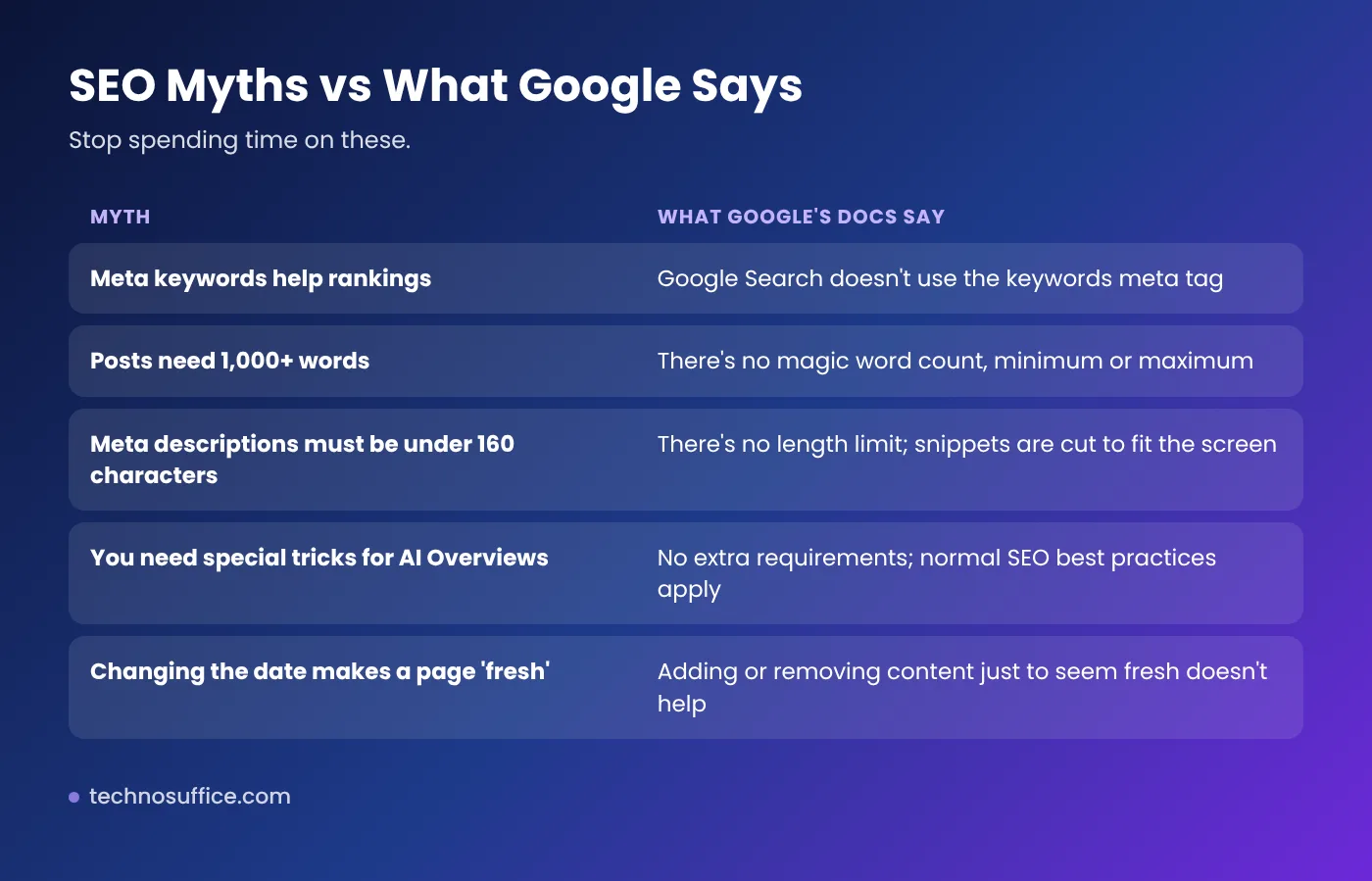
- Meta keywords: Google Search doesn't use them.
- Word count targets: there's no minimum or maximum.
- Keyword stuffing: repeating words makes pages worse and can break spam rules.
- Fake freshness: changing the date without real updates won't help.
Frequently Asked Questions
How can I improve my website's SEO for free?
Match search intent, fix titles and meta descriptions, link your pages together, speed up your site and set up Google Search Console. Free tools like an SEO checker, schema generator and keyword tool cover most of the work.
How long does SEO take to show results?
It varies by competition, site history and how much you improve. Small fixes can show up after Google recrawls your pages. Bigger gains usually build over several months.
Does word count matter for SEO?
No. Google says there's no magic word count. Cover the topic fully for what the searcher needs, and stop there.
Are backlinks still important for SEO?
Yes, links from relevant, trusted sites still help. But paid or manipulative links break Google's spam policies and can hurt you.
What is the ideal meta description length?
There's no official limit. Keep the key message in the first part, since Google cuts snippets to fit the screen. Many SEOs aim for roughly 140 to 160 characters.
Do I need to optimize differently for Google's AI Overviews?
No. Google says no special optimization is needed. Strong, helpful pages that follow normal SEO best practices are what it looks for.
Conclusion: Small, Steady SEO Wins Add Up
You don't need tricks to rank in 2026. Use these SEO tips one by one: match intent, write helpful pages, tidy up your titles and links, keep your site fast, and earn links honestly. Then check your progress in Search Console every month.
Start with a free scan using our Website SEO Checker. If you'd like experts to handle it, see our SEO services or request a free quote.