To optimize your Google Business Profile, fill in every field with correct details, pick the most specific primary category, add real photos, and get and answer reviews on a steady schedule. Google ranks local results on three things: relevance, distance and prominence. Your profile is the main place where you can move the first and the third.
Below is the full checklist we use when we set up and clean up profiles for local businesses. It covers the 15 steps, the rules that get profiles suspended, a weekly routine, and how to tie your profile to your website so Google trusts both. The examples use a made-up dental office in Austin, Texas, but the steps work the same for a plumber in Ohio, a cafe in Sydney or a salon in Manchester.
Quick Answer: Google Business Profile Optimization at a Glance
| Area | What to do | Why it matters |
|---|---|---|
| Verification | Claim and verify the profile | Unverified profiles are less likely to show up, and you can't reply to reviews |
| Name, address, phone | Use your real-world name and the same details everywhere | Mismatched details confuse Google and customers |
| Categories | One specific primary category, few extra ones | The biggest signal for which searches you show up in |
| Description | Plain, useful text under 750 characters | Tells people (and Google) what you do and for whom |
| Services and products | List each one with a short, clear name | Helps you match more specific searches |
| Photos | Real photos of the outside, inside, team and work | People trust what they can see |
| Reviews | Ask every happy customer, reply to every review | Reviews feed "prominence," one of Google's three ranking factors |
| Posts | One short update or offer a week | Shows the business is active and gives people a reason to click |
| Website | Matching details, LocalBusiness schema, a fast page | Your site backs up what your profile says |
How Google Ranks Local Businesses (In Plain Words)
When someone searches "dentist near me" or "emergency plumber Dallas," Google shows a map with a short list of businesses. People often call this the "local pack" or "map pack." The same profiles also show up inside Google Maps.
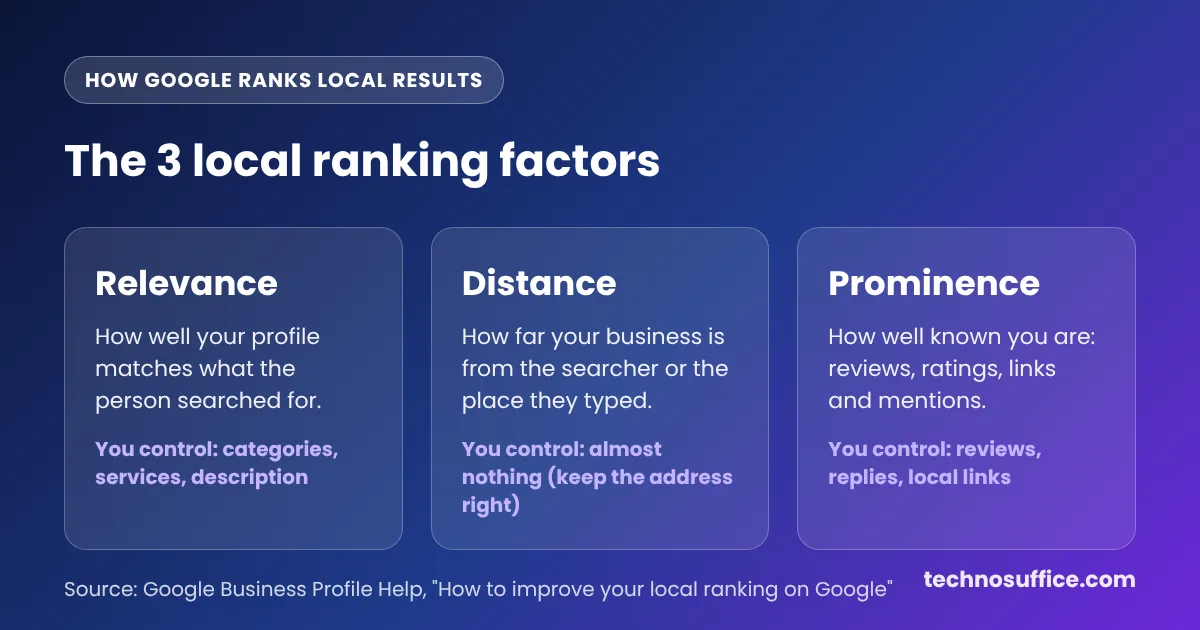
Google says it picks these results using three factors:
- Relevance means how well your profile matches what the person typed. Your categories, services and description drive this.
- Distance means how far your business is from the searcher, or from the place named in the search. You can't change this, apart from keeping your address correct.
- Prominence means how well known your business is. Google looks at things like reviews, ratings and how many websites link to you.
Google also says there is no way to pay for a better local ranking. Ads can appear above the map, but they don't move your free position. So the work below is the real lever you have.
How to Optimize Your Google Business Profile: 15 Steps
Work through these in order. The first five fix the base, and the rest build trust and clicks over time. Most owners can finish steps 1 to 8 in one afternoon.
1. Claim and verify your profile
Go to business.google.com and sign in with a Google account the business owns, not a staff member's personal email. Search for your business. If a profile already exists, request access. If not, create one.
Google then asks you to verify. The method depends on your business type and location. Many owners now get a video option, where you record your sign, your street and proof that you run the place, such as keys to the front door or a business license. Postcards and phone checks still exist for some businesses. Google states that verified businesses are more likely to show up in local results, and you can't reply to reviews until you're verified.
2. Use your real business name, nothing extra
Your name on Google should match your sign, your website and your invoices. Google's profile guidelines ban adding taglines, service words, city names, phone numbers or store codes to the name.
So "Maple Street Dental" is fine. "Maple Street Dental – Best Teeth Whitening Austin TX" is keyword stuffing, which means cramming search words where they don't belong. It can get your profile suspended, and competitors do report it.
3. Get your address or service area right
If customers come to you, add your full street address. Put the suite number on the second address line. P.O. boxes and virtual offices aren't allowed.
If you go to customers, like a roofer or a mobile dog groomer, you're a service-area business (SAB). Hide your address and set the cities or ZIP codes you serve. Google's guidelines say the area usually shouldn't reach farther than about two hours of driving from your base.
4. Keep your NAP the same everywhere
NAP stands for name, address and phone number. Write them the same way on your profile, your website footer, Yelp, Facebook, Bing Places, Apple Business Connect and any local directories. These directory listings are called citations.
Small differences add up. "Ste 200" on one site and "Suite 200" on another is fine, but an old phone number or old address on a big directory is not. Use a local phone number on your profile if you have one, and keep call-tracking numbers as "additional phones" so your main number stays the same.
5. Pick the most specific primary category
Your primary category is the strongest relevance signal you control. Choose the narrowest one that is true. "Pediatric dentist" beats "Dentist" if that's mainly what you do. "Pizza restaurant" beats "Restaurant."
Google lets you add up to nine extra categories, but its guidelines say to use as few as possible. A simple test from Google: the category should finish the sentence "This business is a…," not "This business has a…." A hotel that has a restaurant inside is still a hotel.
A good way to choose is to search your main service in your city and open the top three map results. Their categories are shown under the business name. Pick from those only if they truly describe you.
6. Write a helpful business description
The "From the business" description can hold up to 750 characters. Use it to say what you do, who you serve, where you are and what makes you different. Google doesn't allow links, prices or sales offers in it.
Here's a sample we wrote for our made-up dental office. We counted it at 470 characters and 83 words, so it leaves plenty of room under the limit:
Maple Street Dental is a family dental office in downtown Austin, Texas. Dr. Lee and our team offer cleanings, fillings, crowns, teeth whitening and clear aligners for kids and adults. We see new patients within the same week, and we accept most PPO dental plans. Our office is two blocks from the Capitol, with free parking behind the building. We speak English and Spanish, and we explain every step before we start, so you always know what you are paying for and why.
Notice what it doesn't do. It doesn't repeat "Austin dentist" five times. Keywords in the description seem to help far less than categories and reviews, so write it for people first.
7. Set your hours, holiday hours and more hours
Wrong hours are one of the fastest ways to lose a customer. Someone drives over, finds the door locked and leaves a one-star review. Set your regular hours, then add special hours before every holiday, such as Thanksgiving, Christmas Eve and July 4.
Many categories also offer "more hours," such as delivery hours, senior hours or drive-through hours. Fill these in if they apply, because people use them to decide when to come in.
8. Add every service and product
Open the Services section and add each service with a short, plain name and a one-line description. Use the words customers use. People search "teeth whitening," not "cosmetic enamel brightening."
Retail shops can add products with photos and prices. Stores in eligible countries can also link a Google Merchant Center account so in-store stock can show on the profile. Restaurants can add a menu.
9. Choose the attributes that fit
Attributes are small labels like "Wheelchair accessible entrance," "Free Wi-Fi," "Women-owned," "Veteran-led" or "Online appointments." The list you see depends on your category and country. Tick every one that is true. They help people filter results and choose you, and some show up right on the profile.
10. Upload real photos (and get the specs right)
Photos are often the first thing people look at. Add your storefront in daylight so people can find you, the inside of your place, your team, and your work. A before-and-after photo for a contractor or a plated dish for a restaurant does more than any stock image. Skip stock photos. Customers can tell, and they make a real business look fake.
Google's photo rules are simple:
| Setting | Google's requirement |
|---|---|
| Format | JPG or PNG |
| File size | Between 10 KB and 5 MB |
| Recommended size | 720 × 720 pixels |
| Minimum size | 250 × 250 pixels |
Photos straight from a modern phone usually fit. Photos from a DSLR camera or a design app can go over 5 MB. If one gets rejected, shrink it with our free image compressor, which runs in your browser, and upload it again. Short videos of a walk-through or your team at work are worth adding too.
11. Ask for reviews the right way
Reviews feed prominence, and they are the main thing people read before they call. The trick is to ask every customer, at the right moment, with a direct link.
To get your link, open your profile, select Read reviews, then Get more reviews. You can copy the review link or save a QR code (the QR code only works from a computer browser right now). Put the link in your follow-up text or email, on your receipt and on a small card at the counter.
Stay inside Google's review policy. You can't offer discounts, gifts or payment for reviews. You can't ask only happy customers and skip the unhappy ones, which is called review gating. Staff and family can't review the business. Breaking these rules can get reviews removed or the account suspended.
12. Reply to every review, good and bad
Select Read reviews, then the Reply icon next to a review. Google says helpful replies show you care about customers, and the reviewer gets a notice when you reply.
Keep replies short and human. Thank the person, mention what they liked, and use their first name. For a bad review, stay calm, say sorry for the experience, and give a way to fix it offline, like a phone number or email. Never share private details, especially for health, legal or money businesses.
If you get a lot of reviews, our free sentiment analyzer can sort pasted review text into positive, negative and neutral. That helps you spot which complaints keep coming back, like wait times or parking.
13. Publish posts every week
Posts are short updates that appear on your profile. You can share an update, an offer or an event, with a photo and a button like "Call now" or "Learn more." One post a week is a good pace for most small businesses.
Don't expect posts to push you up the map by themselves. Their main job is to turn viewers into callers. A clear offer with a real end date ("Free whitening consult with any cleaning, through Nov 30") does better than "We're open!"
14. Add booking, messaging and website links that work
Add your booking link if you take appointments, and your menu or order link if you sell food. Point your website button at the best page for the visitor. For a single-location business, that's usually the home page. For a business with several locations, link each profile to its own location page.
Add a UTM tag to the website link, for example ?utm_source=google&utm_medium=organic&utm_campaign=gbp. A UTM tag is a small label on the end of a URL that tells Google Analytics where a visit came from. Without it, most profile clicks look like ordinary search traffic.
Google has been phasing out the old public Q&A box on profiles. In some places, Google's AI in Maps now answers customer questions using your profile, reviews and website. So put the answers to common questions (parking, payment, insurance, languages) in your services, attributes and on your website, where Google can find them.
15. Back up your profile with your website
Google cross-checks your profile against your site. Make sure your site shows the same NAP, has a page for each main service, and loads fast on a phone. If your pages are slow, our guide on how to speed up your website walks through the fixes.
Then add LocalBusiness schema. Schema is a small block of code (called JSON-LD) that tells search engines your business name, address, phone, hours and type in a format machines read easily. We tested our free schema markup generator for this article. We picked "Local Business," set the type to "Dentist," and filled in the made-up Austin office. It built valid JSON-LD with the address, map coordinates and opening hours in under a minute, and showed "All required fields are filled in." From there, the Copy button copies the code and the Rich Results Test button opens Google's tester.
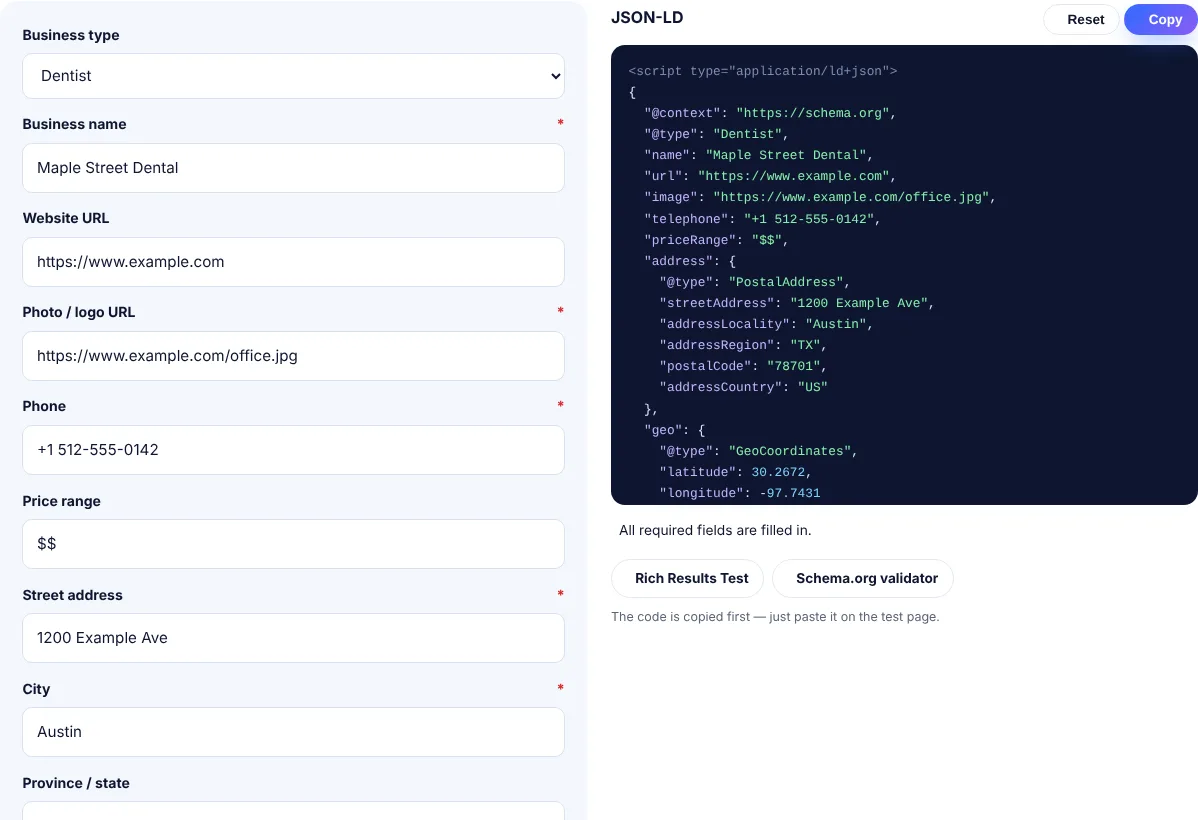
Paste the code into the head of your home page or contact page. Use the exact same details you put on Google.
Common Google Business Profile Problems and Fixes
| Problem | Likely cause | Fix |
|---|---|---|
| Profile suspended | Keywords in the name, a virtual office, or a P.O. box | Fix the issue first, then file a reinstatement request with proof such as a utility bill and sign photos |
| You don't show up for your main service | Wrong or too broad primary category | Switch to the most specific true category and add the service to the Services list |
| Your hours or details changed on their own | Google or users suggested edits | Check the profile monthly and reject wrong edits |
| Photo upload fails | File over 5 MB, under 250 px, or wrong format | Export as JPG, resize or compress, then try again |
| Reviews disappear | Google's automated spam filters, often after a sudden burst of reviews | Ask steadily over time and let customers review from their own phones; never hand them a shop tablet |
| Duplicate listings | An old profile from a past address or owner | Request access to the duplicate and ask Google to merge or remove it |
| Lots of views, few calls | Weak photos, few reviews, or no clear offer | Add real photos, push for reviews, and post an offer with a call button |
Best Practices to Keep Your Profile Strong
A profile isn't a one-time job. The businesses that stay at the top of the map treat it like a shop window and keep it clean.
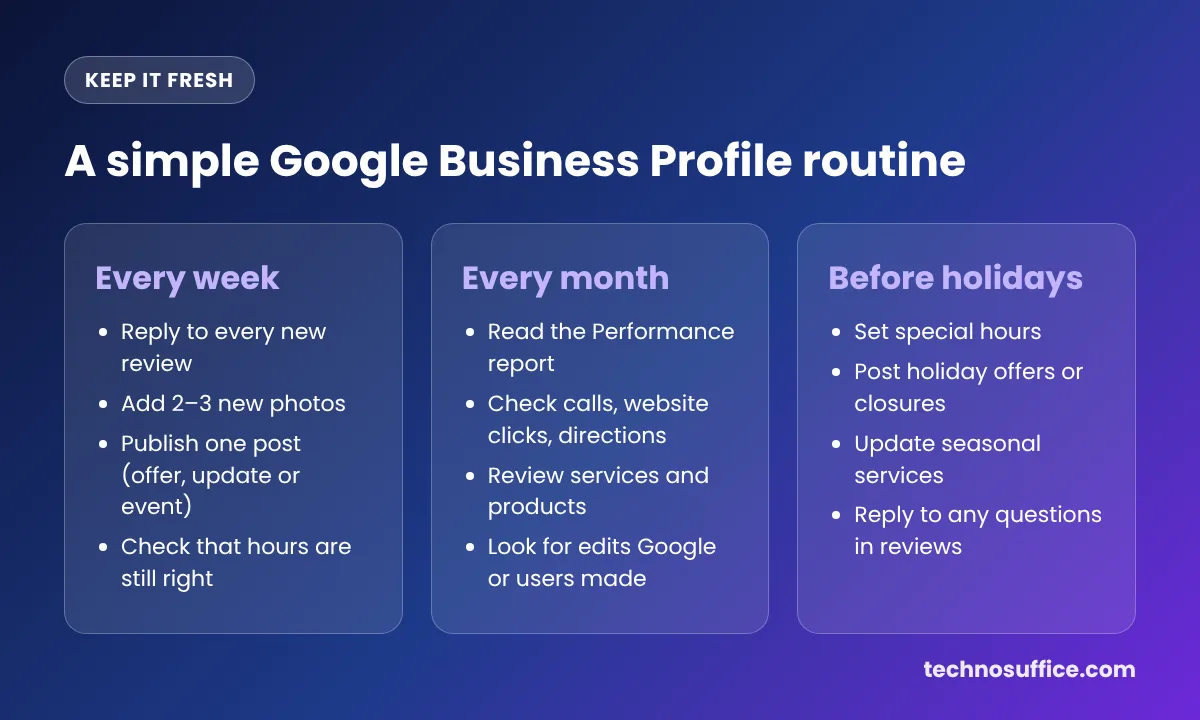
- Read your Performance report each month. It shows how many people called, asked for directions or clicked to your site. Watch the trend, not one week.
- Turn on notifications for new reviews and suggested edits so nothing sits unanswered.
- Add user access, don't share passwords. Give your marketing agency or staff "Manager" access and keep yourself as the primary owner.
- Don't change your name or address often. Big changes can trigger a new verification.
- Don't create profiles for virtual offices or extra "locations" without staff and signs. This is one of the most common reasons for suspension.
- Build local links. A mention on your chamber of commerce site, a local news story or a sponsor page for a youth team all help prominence.
Your profile also works best next to good on-page SEO on your website. Our 12 SEO tips to improve your website ranking cover the site side.
When to Get Help With Local SEO
Most single-location owners can do everything above themselves. It gets harder if you have several locations, a suspended profile, a lot of duplicate listings, or strong competitors who spam the map. That's when a second pair of eyes pays off.
Our SEO services include Google Business Profile optimization, local citations, LocalBusiness schema and monthly reports that show calls, clicks and rankings. We'll tell you honestly if your profile only needs small fixes.
Frequently Asked Questions
How long does it take for Google Business Profile changes to work?
Simple edits like hours or photos often show within a few days, after Google reviews them. Ranking changes take longer. Most businesses see a change in calls and map position over several weeks, and reviews keep helping for months as they build up.
Is Google Business Profile free?
Yes. Creating, verifying and managing a Google Business Profile costs nothing. Google also says you can't pay for a better local ranking. You only pay if you choose to run Google Ads, which appear in separate ad spots.
How many categories should I choose?
Choose one specific primary category, then add only the extra categories that describe your core business. Google allows up to nine extra ones, but its guidelines say to use as few as possible. Three or four well-chosen categories are usually enough.
Should I put keywords in my business name?
No. Google's guidelines don't allow extra words in your business name, and it's a common reason for suspension. The only exception is when the keyword is part of your real, legal name and it appears on your sign and paperwork.
Can I rank in a city where I don't have an office?
It's hard. Distance is one of Google's three factors, so profiles usually rank best near their real address. A service-area business can list nearby cities it serves, and city pages on your website can help you show up in normal search results there.
How do I get more Google reviews?
Ask every customer, right after a good experience, and send them your direct review link by text or email. Make it easy, with one tap. Don't offer rewards or ask only happy customers, because both break Google's rules.
Do Google posts help my ranking?
Not much on their own. Posts mainly help people decide to call or visit, because they show fresh offers and news. They also show the business is active, which helps when someone is comparing you to a competitor with an empty profile.
Start With the First Five Steps Today
If you only have an hour, verify the profile, clean up the name and address, fix your primary category, write a plain description and set holiday hours. Then ask your next ten customers for a review. Those few changes fix most of the problems we see when we audit local profiles.
Want your website to back up your profile? Build your LocalBusiness code with our free schema markup generator. It's free, with no sign-up. Or talk to our local SEO team if you'd like us to handle it for you.