Custom software for business is software built around the way your company works, instead of making your team bend to a ready-made app. You don't always need it. But if your staff lives in spreadsheets, copies data between tools, or keeps hitting the limits of an app, custom software can save hours every week and remove costly mistakes.
This guide is for business owners and managers. You'll learn the clear signs you need custom software, when an off-the-shelf tool is the smarter choice, what drives cost and timeline, and how to choose a developer you can trust.
What Is Custom Software?
Custom software (also called bespoke software) is an app, system or tool made for one company's needs. You decide the features. You usually own the code. It can run on the web, on phones, or behind the scenes connecting your other tools.
Common examples:
- A customer portal where clients book, pay and track orders.
- An internal dashboard that pulls sales, stock and support data into one screen.
- A quoting or pricing tool that follows your exact rules.
- A field-service or delivery app for staff on the move.
- An integration that syncs your store, CRM and accounting app automatically.
Off-the-shelf software is the opposite. Tools like QuickBooks, HubSpot or Shopify are built for thousands of companies at once. They are fast to start and cheaper up front, but you get the same features as everyone else.
Custom Software vs Off-the-Shelf: Quick Comparison
| Factor | Off-the-shelf software | Custom software |
|---|---|---|
| Upfront cost | Low (monthly subscription) | Higher (you pay to build it) |
| Time to start | Same day | Weeks to months |
| Fit to your process | You adapt to the tool | The tool adapts to you |
| Ongoing fees | Per-user fees that grow with your team | Hosting, support and updates |
| Integrations | Limited to what the vendor supports | Built to connect to your systems |
| Ownership | You rent it; the vendor controls changes | You usually own the code (check your contract) |
| Competitive edge | Same tool your competitors use | Can support what makes you different |
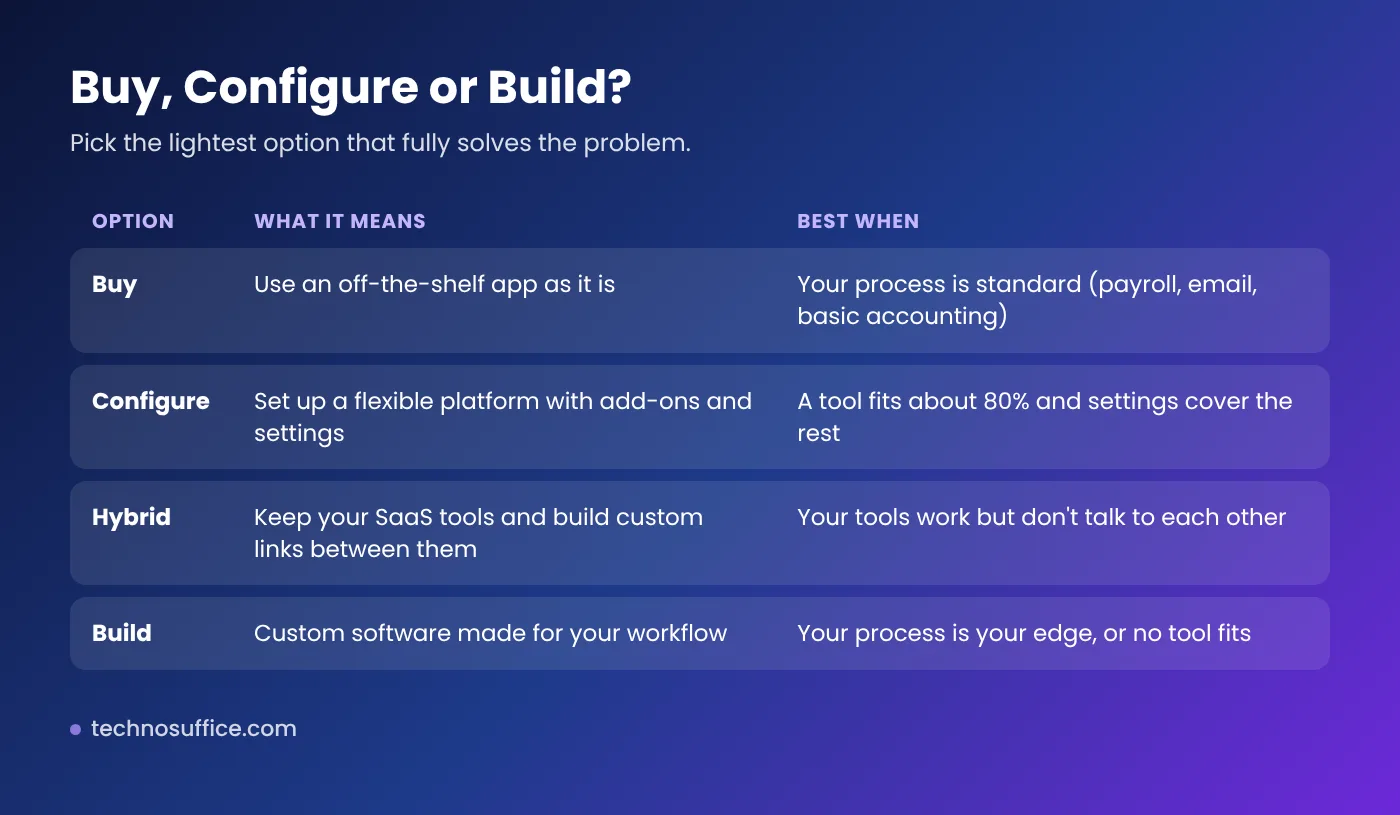
There is also a middle path. Many businesses keep their main SaaS tools and pay for small custom pieces, like an integration or a client portal. This "hybrid" approach often gives the best value.
7 Signs Your Business Needs Custom Software
Go through this checklist. If three or more sound familiar, it's worth exploring custom software for your business.
- Spreadsheets run your business. Key data lives in files that get emailed around, overwritten or lost.
- Staff copy data by hand. People re-type orders, invoices or customer details from one app into another.
- Your tools don't talk to each other. Your store, CRM and accounting show different numbers.
- You pay for many apps but use a few features of each. Subscription costs keep climbing as you add users.
- Your process is unique. Your pricing, scheduling or approval steps don't fit any app without awkward workarounds.
- Customers feel the friction. They wait for quotes, chase updates by phone, or fill in the same form twice.
- You've hit a wall. The vendor won't add the feature you need, or the app slows down as you grow.
When Off-the-Shelf Software Is the Better Choice
Custom software is not always the answer. Stick with a ready-made tool when:
- The job is standard, like email, payroll, basic bookkeeping or video calls.
- You are still testing your business idea and your process changes every month.
- A popular tool already does 80–90% of what you need and settings cover the rest.
- You don't have budget for ongoing support and updates after launch.
A good developer will tell you this honestly. If someone pushes you to build something an existing tool already does well, treat it as a warning sign.
Benefits and Trade-Offs of Custom Software for Business
Benefits
- Fits your workflow. Screens and steps match how your team already works, so training is easier.
- Automation. Invoices, reminders, reports and data syncs can run on their own.
- Grows with you. You add features when you need them, not when a vendor decides to.
- One source of truth. Data flows between systems, so everyone sees the same numbers.
- Ownership. With the right contract, you own the code and your data.
Trade-offs
- Higher upfront cost and time than signing up for an app.
- You need ongoing care. Security updates, hosting and bug fixes don't stop after launch.
- Quality depends on the builder. Custom code is only as secure and reliable as the team that writes it. Being "unique" does not make software safe by itself.
What Affects the Cost and Timeline?
Every project is different, so be careful with anyone who quotes a price before understanding your needs. These are the factors that move cost and time up or down:
| Factor | Lower cost and faster | Higher cost and slower |
|---|---|---|
| Scope | One clear problem, a few screens | Many user types, roles and workflows |
| Platforms | Web app only | Web plus iOS and Android apps |
| Integrations | None or one well-documented API | Several older systems with poor APIs |
| Data migration | Starting fresh | Moving years of messy data |
| Compliance | No sensitive data | Health, payment or financial data (HIPAA, PCI DSS) |
| Design | Simple, standard screens | Highly custom, branded experience |
| Decisions | One decision-maker, quick feedback | Many stakeholders, slow approvals |
Tip: Ask for a small first version, often called an MVP (minimum viable product). It solves the most painful problem first, gets into your team's hands sooner, and lets real use guide the next features.
Also ask how the work is priced. A fixed price works when the scope is very clear. Time and materials works better when you expect to learn and adjust as you go. Either way, budget for hosting and support after launch.
The Custom Software Development Process, Step by Step
Here's what a healthy project looks like, and what you should get at each step.
- Discovery. The team learns your goals, users and current tools. You get: a written scope and a list of features in priority order.
- Design. Wireframes and clickable prototypes show how the software will look and work. You get: a prototype to test with your staff before any code is written.
- Build in short cycles. Developers work in sprints of one to two weeks. You get: regular demos so you can give feedback early.
- Testing. The team tests features, security and speed, then your staff try it with real tasks. You get: a test plan and a sign-off step (user acceptance testing).
- Launch. Data is moved, users are trained and the system goes live. You get: access to the code, hosting and admin accounts.
- Support and improvement. Bugs are fixed and new features are added based on real use. You get: a clear support agreement with response times.
How to Choose a Custom Software Developer
The right partner matters more than the tech stack. Use these questions in your first calls:
- Can you show similar projects and connect me with a past client?
- Who exactly will work on my project, and where are they based?
- Will I own the source code and have access to the code repository from day one?
- How do you handle security? (A good answer mentions practices like the NIST Secure Software Development Framework, code reviews and testing.)
- How do you test before launch?
- How do you handle change requests and scope changes?
- What does support cost after launch, and how fast do you respond to issues?
- If we stop working together, how do you hand over the code and documents?
Red flags: a price before any discovery, no written scope, no demos until the end, or vague answers about who owns the code.
If your project is mainly a website or web app, our guide on custom web development vs templates can help you decide what level of custom work makes sense.
Custom Software Trends to Plan for in 2026
- AI where it helps. Add features like document reading, smart search or summaries only where they save real time. Not every app needs AI.
- API-first builds. Software designed to connect to other tools is easier to extend later.
- Cloud hosting. Most new business software runs in the cloud, which makes scaling and backups simpler. See our cloud and DevOps services if you need help with hosting.
For a wider view, read our article on the future of IT services.
Frequently Asked Questions
Is custom software worth it for a small business?
It can be, when a problem costs you real time or money every week and no affordable tool solves it. Start small with one high-value feature, measure the time saved, then decide on the next step.
How much does custom software cost?
It depends on scope, platforms, integrations, data migration and compliance needs. A small internal tool costs far less than a multi-platform system. The only reliable way to know is a scoped quote after a discovery session.
How long does it take to build custom software?
Small tools can be ready in weeks. Larger systems take months. Building a focused first version (MVP) is the fastest way to get value early.
Who owns custom software after it's built?
Usually you do, but only if your contract says so. Make sure the agreement covers ownership of the source code, designs and data, and that you get access to the code repository.
Should I build in-house or hire a development company?
Hiring an in-house team makes sense if software is your core product and you need constant work. For most businesses, an outside team is faster to start and easier to scale up or down.
Can custom software work with the tools I already use?
Yes, in most cases. If your current tools have APIs, custom software can connect to them and sync data automatically.
Conclusion: Start With the Problem, Not the Software
Custom software for business pays off when it fixes a real, repeated problem that off-the-shelf tools can't. Use the checklist above, start with the lightest option that works, and build only what gives you an edge. Choose a developer who scopes before quoting, shows work often and gives you full ownership.
Not sure if you need custom software? Tell us about your process and we'll give you an honest answer. Request a free quote or explore our web development services and mobile app development services.