The website development process is the set of steps a team follows to plan, design, build, test and launch a website. Most professional projects follow seven steps: discovery, planning, design, content, development, testing and launch, followed by ongoing care. Knowing these steps helps you budget your time, avoid delays and get a site that actually brings in customers.
This guide is written for business owners, not developers. For each step, you'll see what happens, what you need to provide, and what can slow things down. You'll also get a quality checklist to use before launch.
The Website Development Process at a Glance
| Step | What happens | Your role | What you get |
|---|---|---|---|
| 1. Discovery | Goals, audience and competitors are reviewed | Share goals, budget and examples you like | A written project brief and scope |
| 2. Planning | Sitemap, page list and features are set | Approve the page list and priorities | Sitemap and wireframes |
| 3. Design | Visual design for key pages | Give clear, combined feedback | Approved designs for desktop and mobile |
| 4. Content | Text, images and videos are prepared | Write or approve copy; supply photos | Final content for every page |
| 5. Development | The site is coded on a staging server | Review progress on the staging link | A working site to test |
| 6. Testing | Speed, mobile, forms, SEO and security are checked | Test real tasks and sign off | A tested, approved site |
| 7. Launch and care | The site goes live and is monitored | Plan updates and review results | Logins, documents and a support plan |
Step 1: Discovery
Discovery answers one question: what must this website do for your business? The team looks at your goals (calls, bookings, sales or leads), your ideal customers, and what competitors do well or badly online.
Your role: share your goals, budget range, must-have features and two or three sites you like. Name one person who makes final decisions. This alone can save weeks.
Step 2: Planning and Wireframes
Next comes the sitemap (a list of all pages and how they connect) and wireframes (simple layouts showing where things go on each page). This is also when the team decides on the platform or CMS and lists any integrations, like a CRM, booking tool or payment gateway.
If you're replacing an old site, this step should include a redirect plan. Every old URL that matters should point to its new page with a 301 redirect, so you keep your search rankings. Our free Redirect Checker helps confirm they work after launch.
Step 3: Design
Designers turn wireframes into real page designs with your brand colors, fonts and images. Good designers start with mobile, because many visitors will see your site on a phone first.
Tip: gather feedback from your team and send it in one list. Scattered feedback from many people is one of the most common reasons projects run late.
Step 4: Content
Content is the step most businesses underestimate. Every page needs clear text, good photos and a clear next step for the visitor. Write for your customers' questions, not just about your company.
A useful free tool for this step: our Image Compressor shrinks photos so pages load fast. Write a short, clear alt text for every image to help accessibility and SEO.
Step 5: Development
Developers build the site on a private staging server, so you can review it without the public seeing unfinished work. They build page templates, connect the CMS so you can edit content, add forms and integrations, and set up hosting.
Your role: check the staging link at agreed points. Ask how you will add or edit pages after launch, and make sure it's easy.
Step 6: Testing
Testing catches problems before your customers do. Use the checklist below. It turns "quality" into things you can actually measure.
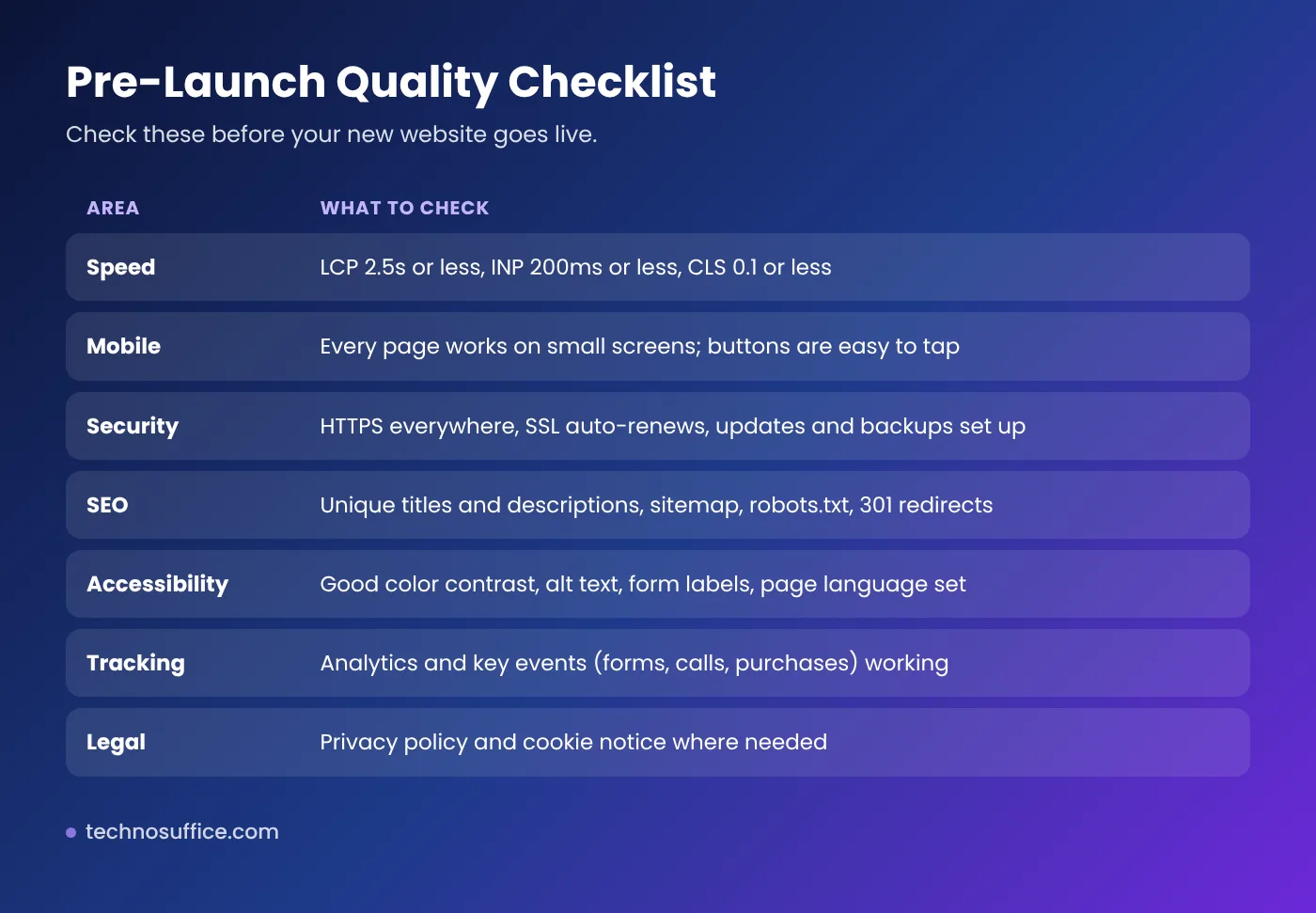
Two of these areas deserve extra attention:
- Speed. Google's Core Web Vitals set clear targets: Largest Contentful Paint (LCP) within 2.5 seconds, Interaction to Next Paint (INP) of 200 milliseconds or less, and Cumulative Layout Shift (CLS) of 0.1 or less.
- Accessibility. The WebAIM Million 2026 study found detectable accessibility errors on 95.9% of the top one million home pages. The most common were low-contrast text, missing image alt text and missing form labels. These are easy to fix during testing.
Run the staging site through our free Website SEO Checker before you sign off. It scores the page on 30+ checks and shows clear fixes.
Step 7: Launch and Ongoing Care
On launch day, the team points your domain to the new site, turns on HTTPS, submits your XML sitemap to Google Search Console and checks that analytics is recording visits and form submissions.
After launch, keep the site healthy:
- Weekly or monthly: software updates, backups and uptime checks.
- At 30 days: check Search Console for crawl errors and 404 pages.
- At 60 days: review which pages bring leads and which visitors leave.
- At 90 days: plan improvements based on real data.
Make sure you receive all logins, the code (if custom), and simple how-to notes before the project closes.
What Slows Down the Website Development Process?
Timelines vary a lot, from a few weeks for a small, simple site to several months for a large or complex one. These are the usual causes of delay:
- Content and photos not ready when development starts.
- Many rounds of feedback, or feedback from too many people.
- New features added mid-project (scope creep).
- Complex integrations or moving lots of content from an old site.
- Slow access to domain, hosting or third-party accounts.
How to Work Well With a Web Developer
- Get a written scope with pages, features and what's not included.
- Agree how changes are handled before work starts.
- Own your accounts. Register your domain, hosting and analytics in your company's name.
- Ask for a staging site so you can review real progress.
- Plan for after launch. Agree on support, updates and response times.
Red flags: no written scope, no staging site, no testing plan, or no answer to "who owns the code and domain?"
Still deciding between a template and a fully custom build? Read our guide on custom web development vs templates.
Frequently Asked Questions
What are the 7 stages of website development?
Discovery, planning, design, content, development, testing, and launch with ongoing maintenance. Some teams merge or split steps, but the order is similar.
How long does it take to build a business website?
A small, simple site can take a few weeks. A larger site with custom features and integrations can take several months. Ready content and fast feedback make the biggest difference.
What should I prepare before hiring a web developer?
Your goals, target customers, budget range, a list of must-have features, examples of sites you like, and access to your domain and current hosting.
What should be on a website launch checklist?
HTTPS, working forms, mobile layout, page speed, unique titles and meta descriptions, an XML sitemap, 301 redirects from old URLs, analytics, backups, and privacy notices.
What happens after a website launches?
The site needs regular updates, backups, security checks and content improvements. Review your analytics and Search Console data at 30, 60 and 90 days.
Who should own the domain and hosting?
Your business should. Register them in your company's name and give your developer access, not ownership.
Conclusion: A Clear Process Makes a Better Website
A good website development process is simple: understand the goal, plan the pages, design for mobile, prepare strong content, build on staging, test against clear targets, then launch and keep improving. When you know your role at each step, projects run faster and the result works harder for your business.
Ready to start? See our web development services or request a free quote and we'll map out the steps for your site.