How do you check an SSL certificate expiration date? Click the padlock or tune icon next to the web address, open the certificate details, and read the date marked "Valid to," "Expires On" or "Not After." It takes a few clicks in Chrome, Edge, Firefox or Safari, and you don't need any code.
If you'd rather skip the menus, type the domain into our free SSL Certificate Checker. It reads the same public certificate every visitor sees, so it works for any website, not only yours. It runs in your browser, and there's no sign-up.
This check matters more now than it did a year ago. Since March 15, 2026, new certificates have a shorter maximum life, so renewals come around more often. A missed renewal turns your site into a warning page. The good news is that this mistake is easy to avoid once you know where to look.
How to check an SSL certificate expiration date (quick answer)
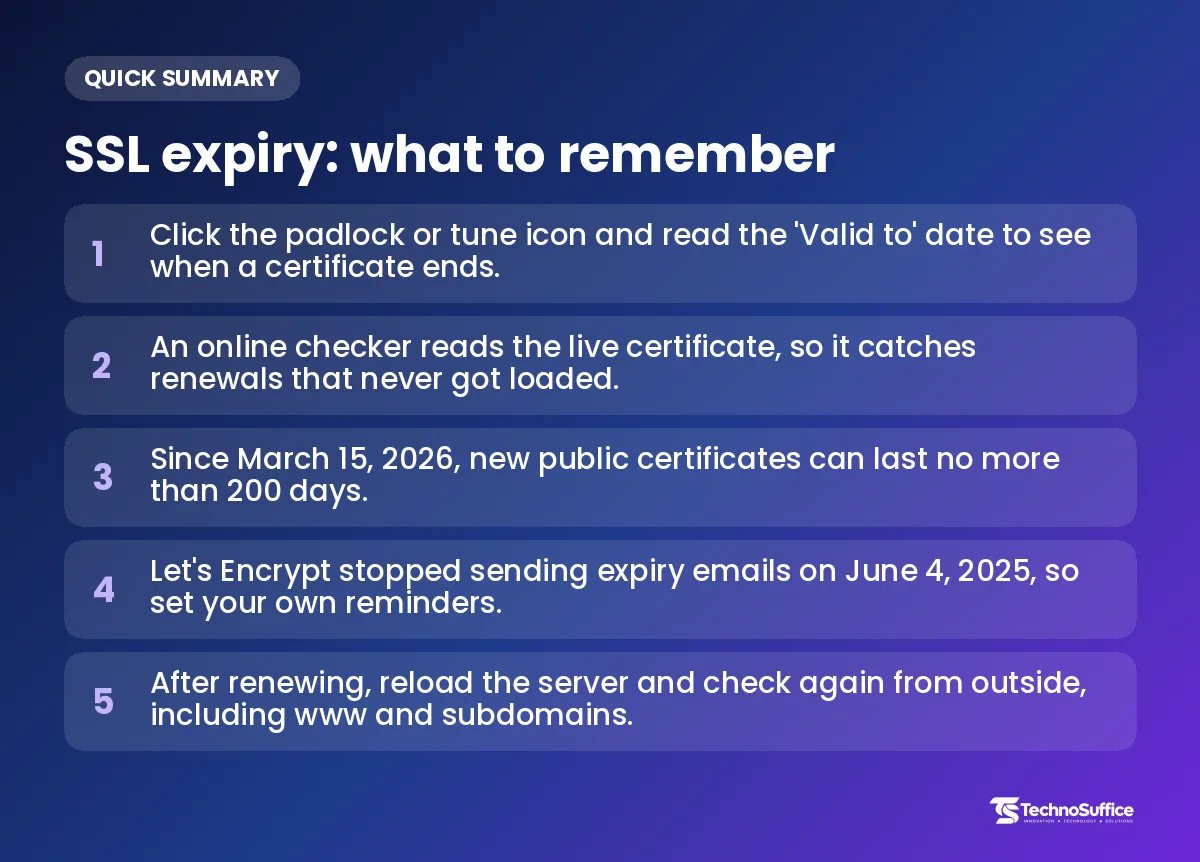
Use your browser for a site you can open, an online checker for any site, and the command line only if you manage servers. All three show the same expiry date. They just present it in different ways.
An SSL certificate is a digital ID card for a website. It lets the browser set up a private, encrypted (scrambled) connection with the site. "SSL" is the old name and "TLS" is the newer one, but most people still say SSL.
The fastest ways in one table
| Method | Best for | Skill needed | Catches "renewed but not loaded"? |
|---|---|---|---|
| Browser padlock | One site you can open right now | None | Yes, it shows the live certificate |
| Online SSL expiry checker | Any site, on any device | None | Yes, it checks from outside your server |
| OpenSSL or PowerShell | Servers, scripts and certificate files | Some command-line use | Only if you check the live site, not the file |
| Monitoring service | Many domains and subdomains | Basic setup | Yes, and it sends alerts |
What "Valid to," "Expires On" and "Not After" mean
All three labels point to the same thing: the last moment the certificate counts as valid. Browsers just name it differently. You'll also see a start date called "Valid from" or "Not Before," which shows when the certificate began. Read the end date, not the start date, or you could think you have months left when you don't.
How do I check SSL expiry in Chrome and other browsers?
In Chrome, click the icon left of the address, choose "Connection is secure," then "Certificate is valid," and read the "Valid to" line. Other browsers follow a similar path with slightly different names, as these browser steps for viewing certificate dates show.
Chrome on desktop
- Open the website you want to check.
- Click the padlock or tune icon at the left of the address bar.
- Click Connection is secure.
- Click Certificate is valid.
- Find the Valid to or Expires On line in the validity section.
Edge, Firefox and Safari
- Edge: Edge is built on the same base as Chrome, so the steps look very similar. Click the padlock, open the connection details, then view the certificate.
- Firefox: Click the lock icon, then Connection secure, then More site information. On the Security tab, click View Certificate. The date sits under Not After in the Validity section.
- Safari on Mac: Click the padlock and open the certificate details. Look for the expiry date in the list of fields.
On a phone
Mobile browsers often hide full certificate details. You may see that the connection is secure, but not the exact end date. On a phone, an online checker is usually the easier route.
Use a free online SSL certificate expiry checker
An online checker is the simplest way to check an SSL certificate expiration date online for any site. You type a domain, and the tool reads the live certificate from outside your server.
Steps with our free tool
- Open the TechnoSuffice SSL Certificate Checker.
- Type the domain, such as
example.com. Leave out "https://" if the tool asks for a plain domain. - Run the check and read the expiry date in the results.
- Repeat the check for
www.example.comand any subdomains you use, like a shop or booking page.
Want to know exactly how many days are left? Enter today's date and the expiry date in our Date & Days Calculator.
Why this catches "renewed but not reloaded" mistakes
A renewed certificate file does nothing until the web server restarts or reloads it. Until then, the file on the server shows a new date, but visitors still get the old certificate. A check from outside sees exactly what visitors see, so it spots this gap.
For example, your host might tell you the certificate was renewed last week. The file is there, but the server never picked it up. Your visitors would still hit the old, expiring certificate, and only an outside check would show you that.
Is it safe?
Yes, for this kind of check. A checker only reads the public certificate your site already shows to everyone, so it never needs your password or your private key. Never paste a private key into any website. If a tool or a person asks for it, stop and treat that as a warning sign.
For developers: check expiry on Linux, Windows Server and the command line
The command line is a text window where you type instructions instead of clicking buttons. On Linux, Ubuntu or macOS, OpenSSL reads the expiry date in one line. On Windows, use certutil or PowerShell, because OpenSSL isn't installed there by default.
OpenSSL: check a live site (Linux and Ubuntu command line)
Replace example.com with your domain:
echo | openssl s_client -connect example.com:443 -servername example.com 2>/dev/null | openssl x509 -noout -enddate
The notAfter value is the expiry date. Use -dates instead of -enddate to see both the start and end dates. OpenSSL shows times in UTC (world standard time), while your browser may show local time, so near midnight the day can look different.
OpenSSL: check a certificate file
Certificate files often end in .pem, .crt or .cer. To read one on disk, run:
openssl x509 -in your_certificate.pem -noout -enddate
Remember that this checks the file, not the live site. A file can look fine while the server still sends an older certificate.
Get a warning if it ends within 30 days
The -checkend option counts in seconds. Thirty days is 2,592,000 seconds:
openssl x509 -in your_certificate.pem -noout -checkend 2592000
It replies "Certificate will expire" or "Certificate will not expire." That plain answer is easy to use in a script that runs on a schedule.
Windows: certutil and PowerShell
For a certificate file, run certutil -dump C:\certs\yoursite.cer and look for NotAfter. On Windows Server, this PowerShell line lists certificates in the machine store with their end dates:
Get-ChildItem Cert:\LocalMachine\My | Select-Object Subject, NotAfter
You can schedule a PowerShell script to check the SSL certificate expiration date and email you. For a small business with a few sites, though, a monitoring service is usually simpler to keep running.
How long is an SSL certificate valid in 2026?
A new public SSL certificate can now last at most 200 days, which is about six and a half months. That limit started on March 15, 2026, and it will get shorter in two more steps.
The change comes from the CA/Browser Forum, a group of certificate companies and browser makers that sets the rules. Its April 2025 vote, called Ballot SC-081v3, approved the new limits. According to Sectigo's explanation of the 200-day change, the old maximum was 398 days, or about 13 months.
| Certificates issued from | Maximum validity |
|---|---|
| Before March 15, 2026 | 398 days (about 13 months) |
| March 15, 2026 | 200 days |
| March 15, 2027 | 100 days |
| March 15, 2029 | 47 days |
Sectigo also notes that a certificate issued the week of March 15, 2026 reached the end of its 200-day period in early October 2026. So if your site got a new certificate in mid-March, it should already have been renewed once. A quick check today will confirm that it was.
The rules also tighten a second step. A Certificate Authority (CA, the company that issues certificates) checks that you control a domain before it issues a certificate. From 2029, it can reuse that check for only 10 days.
SSL expiry myths vs facts
Most expired certificates come from wrong beliefs, not hard technical problems. These are the myths we think cause the most costly mistakes, with the facts behind each one.
Myth: A six-month date means something is wrong with my certificate
Fact: It's normal now. The 200-day cap applies to every CA. SSL.com on certificate validity changes explains that a shorter date doesn't mean your paid plan got cut. The certificate is simply reissued within the same 12-month term.
Myth: My older certificate stopped working on March 15, 2026
Fact: The new limit applies only to certificates issued from that date. A certificate issued earlier keeps its original end date. If yours shows an end date in early 2027, that can be normal, so just add it to your calendar.
Myth: My certificate company will email me before it expires
Fact: Don't count on it. Let's Encrypt, a free and popular CA, stopped sending expiry emails on June 4, 2025, as TechRadar reported. It pointed users to third-party monitoring instead, such as Red Sift Certificates Lite, which is free for up to 250 certificates.
Myth: Auto-renew means I never need to check
Fact: Auto-renewal (a host setting or a tool like Certbot that renews for you) is very helpful, but it can fail without telling you. A changed DNS setting or an expired payment card can stop it. A quick outside check after each renewal date costs you seconds and can save you a lost day of sales.
Myth: If the new certificate file shows a future date, the site is fixed
Fact: The server has to reload the new file first. Until it does, visitors still get the old certificate. Always confirm with a browser or an online checker.
Myth: Checking the main domain is enough
Fact: Your www version, shop, blog or booking subdomain may each use a different certificate. Other sites use one wildcard or multi-domain certificate that covers many names. In that case, a single missed renewal can break many pages at once, so check every name you use.
Myth: A "Not secure" warning always means the certificate expired
Fact: Expiry is a common cause, but not the only one. We cover the other causes in the next section.
| Myth | Fact |
|---|---|
| Six-month certificates mean a problem | The 200-day cap is normal for all new public certificates |
| Old certificates died on March 15, 2026 | Certificates issued earlier keep their original end date |
| I'll get an email reminder | Let's Encrypt stopped expiry emails on June 4, 2025 |
| Auto-renew needs no checking | Renewals can fail without warning, so check from outside |
| A new file on disk means it's fixed | The server must reload before visitors see it |
| The main domain is enough | www and subdomains can have their own certificates |
| "Not secure" always means expired | Wrong name, missing chain or a wrong device clock can cause it too |
What to do instead
- Check the live site from outside, not just the file on your server.
- Read "Valid to," not "Valid from."
- List every domain and subdomain you own, and check each one.
- Turn on auto-renew, then confirm it worked after each renewal date.
- Set your own reminders instead of waiting for an email.
Why does my website show a "Not secure" warning?
Usually the browser can't trust the certificate, and an expired date is one of the most common reasons. An expired certificate causes a hard browser error, often "Your connection is not private," and many visitors will simply leave.
Before you assume expiry, rule out these causes:
- Your device clock is wrong. If your computer's date is off, valid certificates can look expired. Check your own date and time first.
- The name doesn't match. Each certificate lists the domains it covers, called Subject Alternative Names. If www isn't on that list, the www version fails.
- The chain is missing a link. Your site's certificate connects to a trusted root through an "intermediate" certificate. If the server leaves it out, some browsers show errors even when the date is fine.
- The site isn't loading at all. If you see a different error, our guide on checking whether a website is down for everyone helps you narrow it down.
For example, picture a local bakery whose online order page shows this warning on a Friday afternoon. The fix may take minutes, but orders lost over the weekend don't come back. A few seconds of checking each month is a small price for avoiding that.
SSL certificate expired? How to fix it
Renew the certificate, install it, reload the server and check again from outside. Most hosts can handle the first steps for you from their control panel.
- Confirm the expiry. Use your browser or the free SSL checker to make sure the date is really the problem.
- Renew or reissue the certificate through your host or your certificate company.
- Install the new certificate, including the intermediate certificate if your host asks for it.
- Reload or restart the web server. If you use a CDN (a network that serves copies of your site from many locations), clear its cache and confirm it serves the new certificate.
- Re-check from outside on the main domain, www and every subdomain.
- Turn on auto-renewal so the same problem doesn't come back.
If you changed DNS settings (the records that point your domain to your server) along the way, give them time to spread. Our post on how long DNS propagation takes explains what to expect.
When to ask for help
If your site runs on a custom server, or renewals keep failing, it's time to bring in a developer. Our web development team builds sites that are secure by default, with OWASP security practices, SSL and regular backups. SEO and performance are built in from day one, so every site is fast-loading and mobile-friendly.
How to never miss an SSL expiry again
Combine auto-renewal, your own reminders and an outside check. Each one covers a gap the others can miss, so the safest choice is to use all three.
- Auto-renew: Turn it on at your host or in your certificate tool.
- Shared calendar: Add each expiry date, with a first reminder well ahead and a second one closer to the date.
- Alerts that fit shorter lifetimes: A reminder that felt early on a 13-month certificate can be late on a short one. Set alerts as a share of the certificate's life, not out of an old habit.
- Monitoring: If you run many domains, a monitoring service can email or message you before anything ends. Free options exist, like the Red Sift tool Let's Encrypt suggested.
- Re-check after every renewal: Check from outside, every time.
As the limit drops to 100 days in 2027, manual tracking will get tiring. Our post-launch maintenance plans cover updates, security patches, backups and performance monitoring. Our Cloud & DevOps service handles cloud hosting, deployment pipelines and monitoring, so ask our team how certificate renewals can fit into your plan.
Frequently Asked Questions
How do I check when my SSL certificate expires?
Click the padlock in your browser and read the "Valid to" date. You can also enter your domain in a free online checker, which works on any device.
How do I check SSL certificate expiry in Chrome?
Click the icon left of the address, then "Connection is secure," then "Certificate is valid." The expiry date appears as "Valid to" or "Expires On."
How do I check the SSL certificate expiration date in Linux command line?
Run echo | openssl s_client -connect example.com:443 -servername example.com 2>/dev/null | openssl x509 -noout -enddate. The notAfter line is the expiry date, shown in UTC.
How do I check the SSL certificate expiration date on Windows Server?
Use PowerShell with Get-ChildItem Cert:\LocalMachine\My | Select-Object Subject, NotAfter. For a single file, certutil -dump shows the NotAfter date.
Does Let's Encrypt send expiry reminder emails?
No, not anymore. Let's Encrypt stopped those emails on June 4, 2025, so use auto-renewal plus your own reminders or a monitoring service.
How often should I check my SSL certificate expiry date?
Check after every renewal and set reminders well before each end date. New certificates now last 200 days at most, and that drops to 100 days from March 15, 2027, so renewals will keep getting more frequent.
Can I check the SSL expiry of a site I don't own?
Yes. Every website's certificate is public, so your browser or an online checker can read it for any site.
Next step: keep your site secure without the stress
Checking an SSL certificate expiration date takes seconds with your browser or our free SSL Certificate Checker. The real risk is forgetting, and shorter certificate lives make that easier to do.
If you'd rather let us handle it, we can help. TechnoSuffice serves clients worldwide with a dedicated team, a project manager and weekly demos, so you always know what's happening, and our post-launch support keeps things running after launch. Our team replies within one business day. After a free discovery call, you get a fixed quote with milestones and no hidden costs.
Request a Free Quote and let's keep your site fast, secure and trusted by every visitor.